
Display Line Numbers in a SQL Server Management Studio Query Window (SSMS)

Introduction

Sometimes when we encounter an error message for a T-SQL query while debugging. The SQL Server shows the error message along with the line number where the error has occurred. In this article, I will give a simple tip to enable the Line Number feature in SSMS. This feature is applicable to all versions of SSMS starting from SQL Server 2005.

Note: By Default in SSMS display line number is DISABLED.

Display Line Numbers in SQL Server Management Studio (SSMS)

  • Open SSMS. Click Tools and navigate to Options (Tools -> Options).
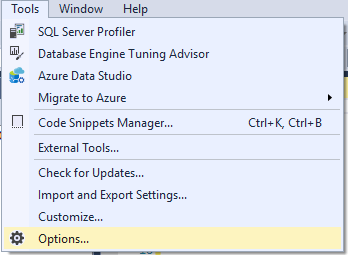
Fig. Tools -> Options
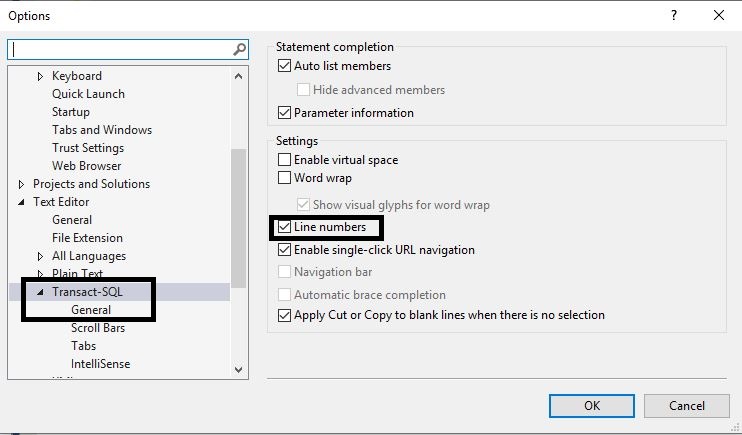
  • In the Options dialog box on the left side pane expand the Text Editor and then expand Transact-SQL
Fig.2 Text Editor Option
  • In General options, under Display  section, Check the Check Box next to Line Numbers as shown in the above and click OK.
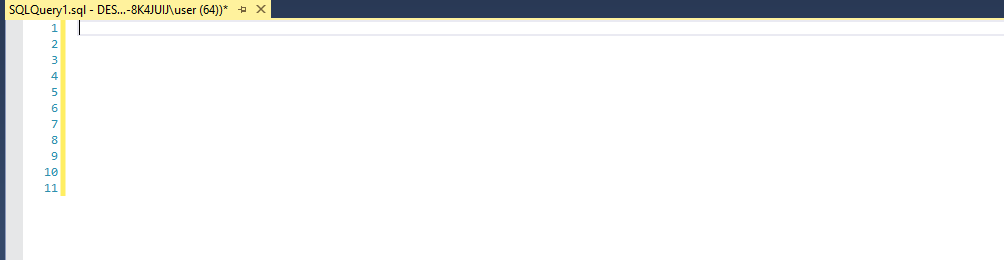
Fig.3 Line Numbers in SSMS Query Window

Conclusion

Thus we can display line numbers in SSMS Query Window. I assume this tip was very useful to you all. Please share your feedback in the comment section.

Consider to read other articles from me in SQL Server,

Responses

  1. […] Display Line Numbers in a SQL Server Management Studio Query Window (SSMS) […]

    Like

  2. […] Display Line Numbers in a SQL Server Management Studio Query Window (SSMS) […]

    Like

  3. […] Display Line Numbers in a SQL Server Management Studio Query Window (SSMS) […]

    Like

  4. […] Display Line Numbers in a SQL Server Management Studio Query Window (SSMS) […]

    Like

  5. […] Display Line Numbers in a SQL Server Management Studio Query Window (SSMS) […]

    Like

  6. […] Display Line Numbers in a SQL Server Management Studio Query Window (SSMS) […]

    Like

  7. […] Display Line Numbers in a SQL Server Management Studio Query Window (SSMS) […]

    Like

  8. […] Display Line Numbers in a SQL Server Management Studio Query Window (SSMS) […]

    Like

  9. […] Display Line Numbers in a SQL Server Management Studio Query Window (SSMS) […]

    Like

  10. […] Display Line Numbers in a SQL Server Management Studio Query Window (SSMS) […]

    Like

Leave a reply to Customize Azure Data Studio with Dashboard Widgets – Learn With Sundar Cancel reply