
Introduction
When working in the SQL Server, we may have to check some other databases other than the current one which we are working. In that scenario we may not be sure that does we have access to those Databases?. In this article we discuss the list of databases that are available for the current logged user in SQL Server
Get the list of database
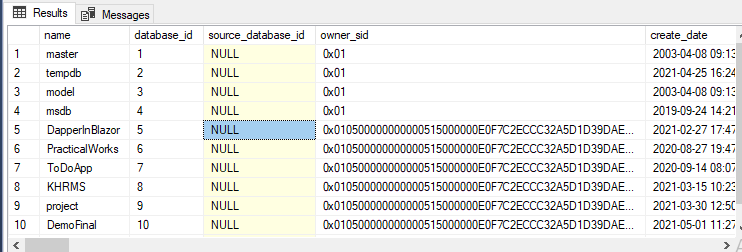
We get the list of databases from the system table sys.databases
SELECT * FROM sys.databases
Now we have to check does the user has access by applying the function HAS_DBACCESS. It returns 1 if the user has access to the database, 0 if the user has no access to the database, and NULL if the database name is not valid. When this function returns 0 that it also means that the database is offline, single-user mode, or any other issues that are preventing us to use the database.
SELECT
	database_id AS DataBaseId,
	Name AS DBName,
	HAS_DBACCESS(Name) AS HasAccess,
	is_read_only as IsReadOnly,
	create_date AS DbCreatedDate
FROM sys.databases
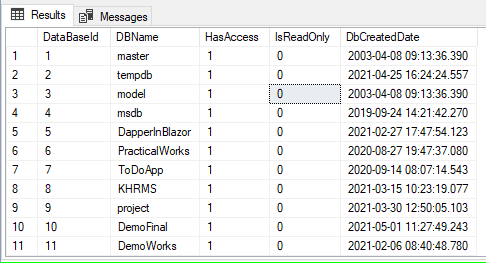
From the above query,
- database_id – Database id
- Name – Name of the database
- HAS_DBACCESS(Name) – Has access or not, if 1 then has access, 0 means not having access or may be other issues
- is_read_only – Shows is read only access or not. If 1 then user have read only permission, if 0 then has both read and write.
Conclusion
In this article, we have discussed about how to check the list of available databases for the logged user. I hope this article was useful. Please share the feedback in the comment section.
 Learn With Sundar
Leave a comment